 Bao CRM
Notion CRM: the complete guide for freelancers
A Notion CRM is a system for tracking prospects and sales built on Notion. To build yours, you need a Prospects database, a few useful properties and two views: a pipeline and a follow-up list. Notion’s free plan is enough for individual use.
What is a Notion CRM?
A CRM helps you track your prospects, your conversations and your sales. A Notion CRM does this in your Notion databases, next to your notes and projects. It comes in three forms:
- A homemade database. You build it yourself, following the steps in this guide.
- A template to duplicate or import. The structure is ready, and you adapt it. The Notion template marketplace has many of them, and ours is free: a Notion CRM template to import as a CSV.
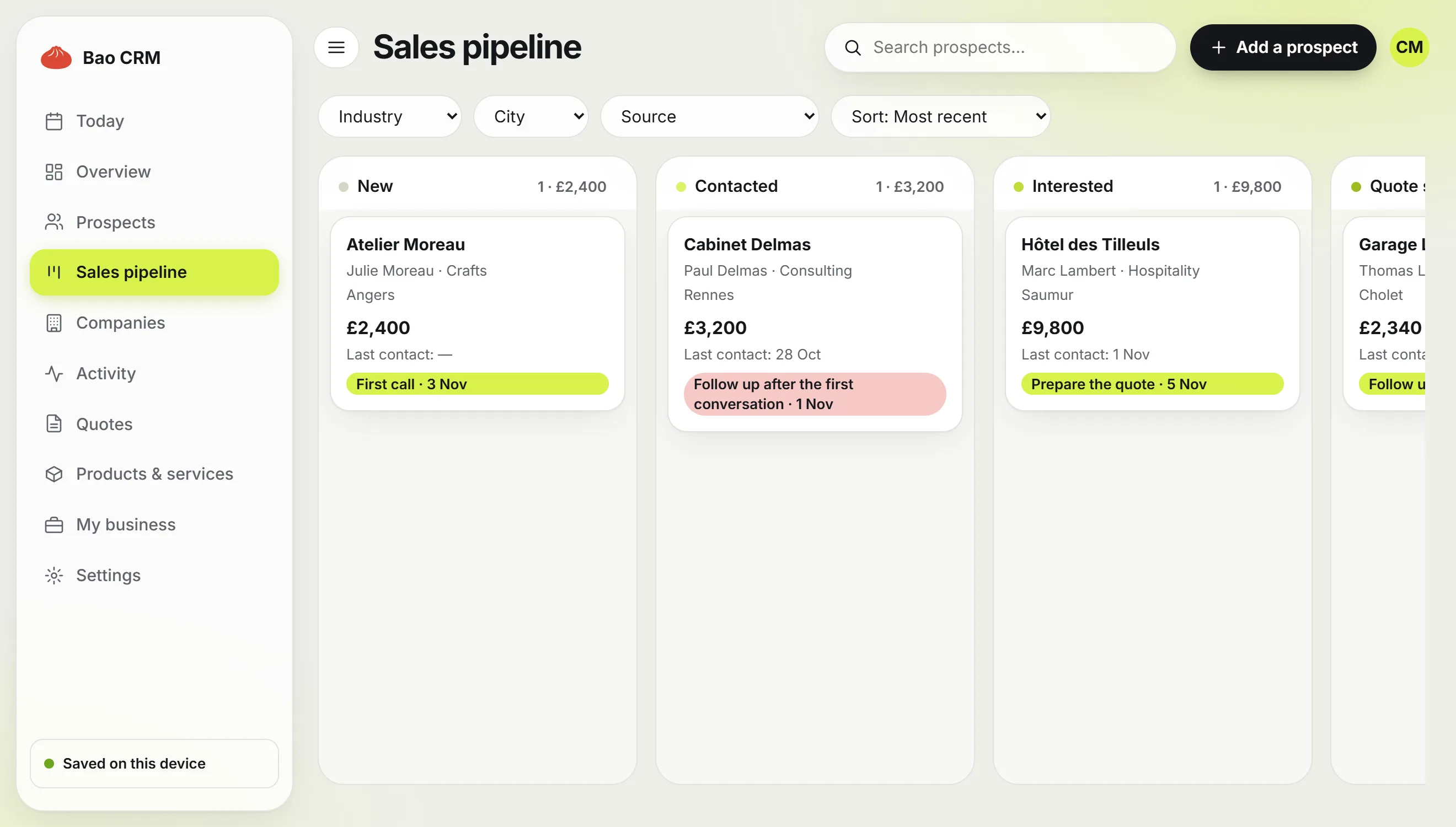
- A connected app. It writes to Notion databases and adds what Notion doesn’t do, such as PDF quotes. Bao CRM works this way, and our comparison places it against the other options.
Can you use Notion as a CRM?
Yes. Notion isn’t a CRM by design, but its databases are enough to track contacts and a pipeline. It’s a good choice when you work alone, with a reasonable number of prospects, and you already open Notion every day.
It’s a weaker fit for a sales team, or if you expect automatic email tracking. The limits are covered below.
One database or several?
Many guides suggest five related databases: contacts, companies, deals, interactions and tasks. That’s solid for a team. When you work alone, every extra database is one more record to keep up to date, and a CRM you don’t keep up to date stops being useful.
Our advice: start with a single Prospects database. Add a relation to other databases the day a specific need appears.
How to build a CRM in Notion in 7 steps
1. Create the Prospects database
Create a page, type /database, choose a full-page database and name it Prospects. If you already keep your contacts in a spreadsheet, import it as a CSV file: Notion creates the database and its columns for you.
2. Add the useful properties
Keep what changes your next decision. These are the properties we use in Bao CRM.
| Property | Type | What it’s for |
|---|---|---|
| Company | Title | The name of the record |
| Contact | Text | The person to talk to |
| Email, Phone | Email, Phone | Reach the prospect in one click |
| City, Industry | Text, Select | Filter your prospects |
| Source | Select | Know where your deals come from |
| Stage | Select | New, Contacted, Interested, Quote sent, Negotiation, Won, Lost |
| Estimated amount | Number, in your currency | See what each stage is worth |
| Last contact | Date | Spot the deals going quiet |
| Next action | Text | Write down what you’ll do next |
| Follow-up date | Date | Feed the follow-up view |
3. Create the Pipeline view
Add a Board view and group it by Stage. Each prospect becomes a card you drag from one column to the next. Show Estimated amount and Next action on the cards so you can decide without opening the record.
4. Create the Follow-ups view
This is the most useful view of the CRM. Add a List view called Follow-ups, then two filters: Follow-up date is today or earlier, and Stage is not Won or Lost. Sort by date, oldest first: the most overdue follow-ups come to the top.
5. Prepare a record template
Create a page template in the database with three headings: Context, Conversations, Next step. Every new prospect then starts with the same structure.
6. Log every conversation
Under Conversations, add a dated line after each call or email, and update Last contact at the same time. A separate Interactions database is only worth it if you want to analyse your conversations.
7. Set up a routine
A Notion CRM won’t remind you on its own. Open the Follow-ups view every morning and apply one simple rule: every active prospect must have a next action and a date. After a conversation, fill in both before you close the record.
Can you automate follow-ups in Notion?
Partly, and mostly on paid plans. Notion’s help centre reserves most database automations for paid plans. On the free plan, rely on your Follow-ups view and your routine.
The limits of a CRM built in Notion
Notion stores everything, and nothing in it checks your work for you. Before you start, keep these points in mind:
- Quotes happen elsewhere. Notion doesn’t produce numbered PDF quotes, and calculating tax, discounts or a deposit is up to you.
- Nothing checks your quotes. A quote missing your client’s address or a validity date goes out as it is.
- Reliability depends on you. A prospect without a follow-up date disappears from the view, with no warning. Our quote follow-up email templates help once the date comes.
- Views are fragile. A filter changed by mistake skews your list for the day, without telling you.
If you track a few prospects and send few quotes, this CRM works very well: keep it. If quotes become regular, a connected app saves you this work. Our comparison sets out the options.
Frequently asked questions
Can I build a free CRM in Notion?
Yes. Notion’s free plan has no page or block limit for individual use, which is enough for a Prospects database and its views. A block limit applies when several members share the workspace.
Can Notion replace a CRM?
For a freelancer tracking a handful of prospects, yes. For a sales team, email tracking or automatic follow-ups, a dedicated CRM is still a better fit.
Do I need several databases?
Not to start with. One well-kept Prospects database is enough for one person. Add a related database only when a specific need appears, such as several contacts at the same company.
How do I import my contacts into Notion?
Save your contacts as a UTF-8 CSV file with the headers on the first row. In Notion, open Settings, Import, CSV, then match each column to its property. On the free plan, the file is limited to 5 MB.
What is the difference between a Notion CRM and Bao CRM?
A classic Notion CRM is a set of databases and views that you maintain yourself. Bao CRM is an app that writes to its own Notion databases and adds what Notion lacks, such as a daily follow-up page, PDF quotes and a quote check before sending.