 Bao CRM
“Who was I supposed to follow up with?”
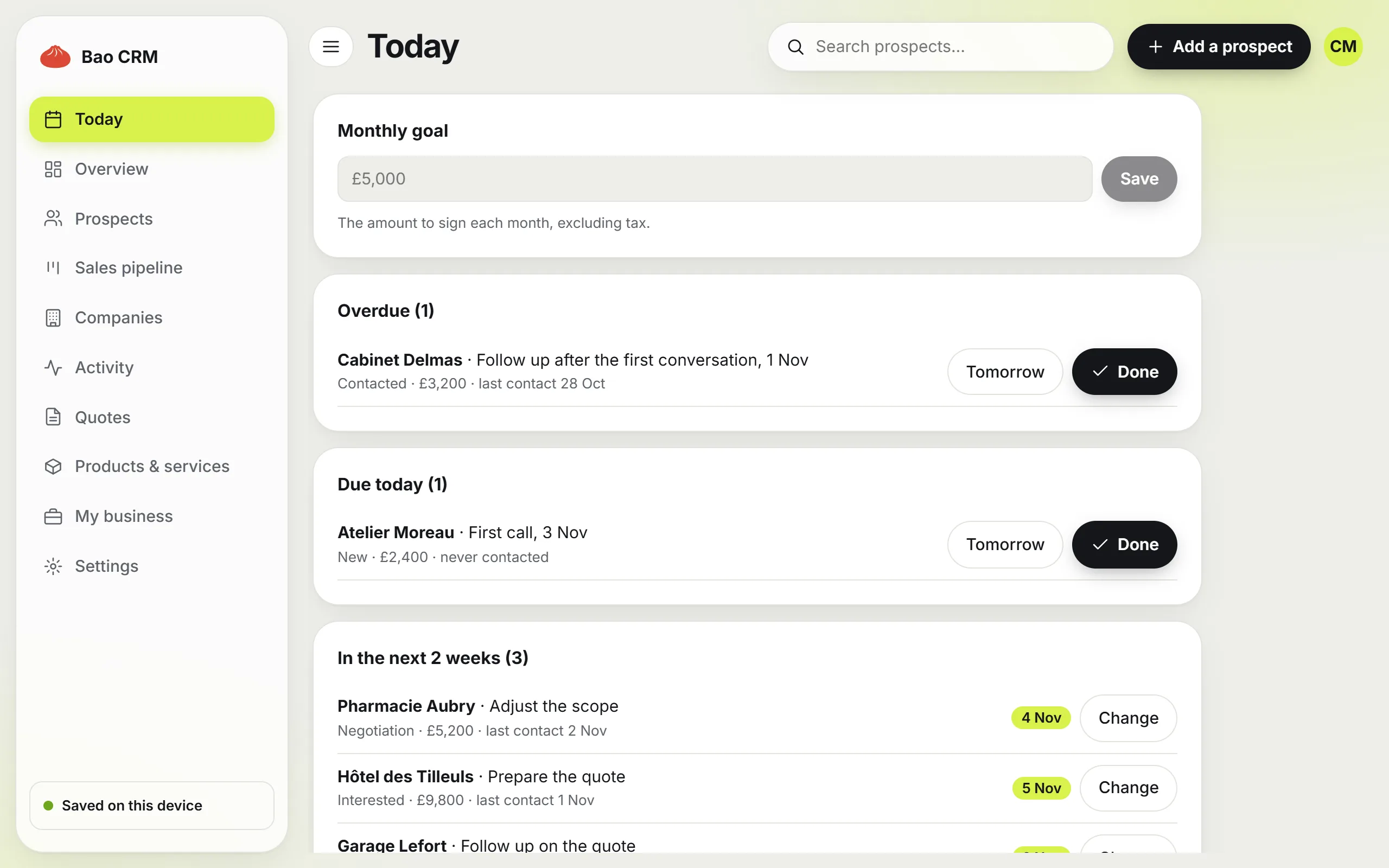
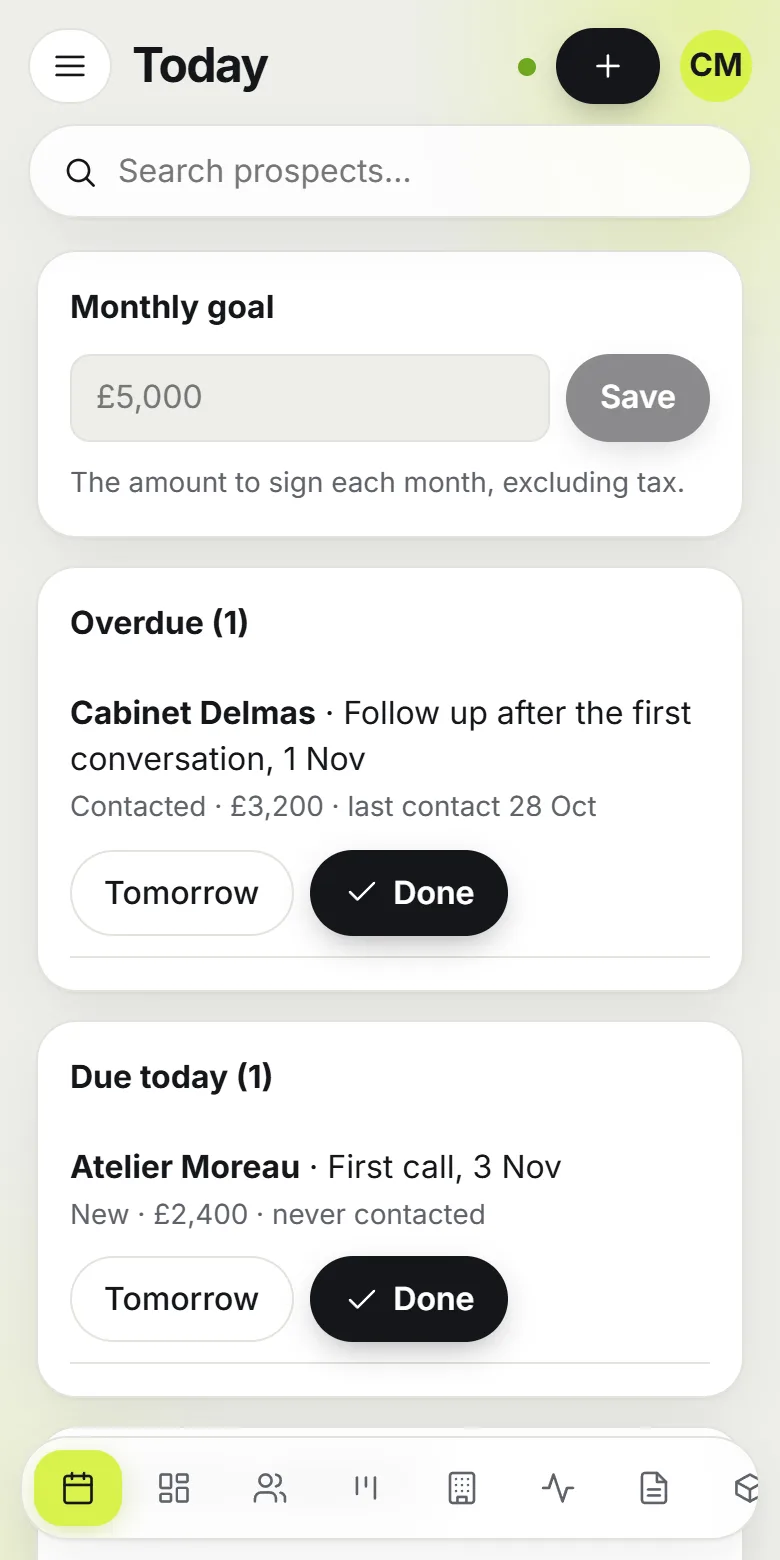
Every prospect has a next action and a date. Overdue follow-ups come first in your day.
For freelancers, the self-employed and small businesses
Bao CRM is an app connected to Notion that turns your workspace into a real CRM: pipeline, follow-ups and professional quotes in your own currency. Start free on your device, with no account, then connect Notion in one click.
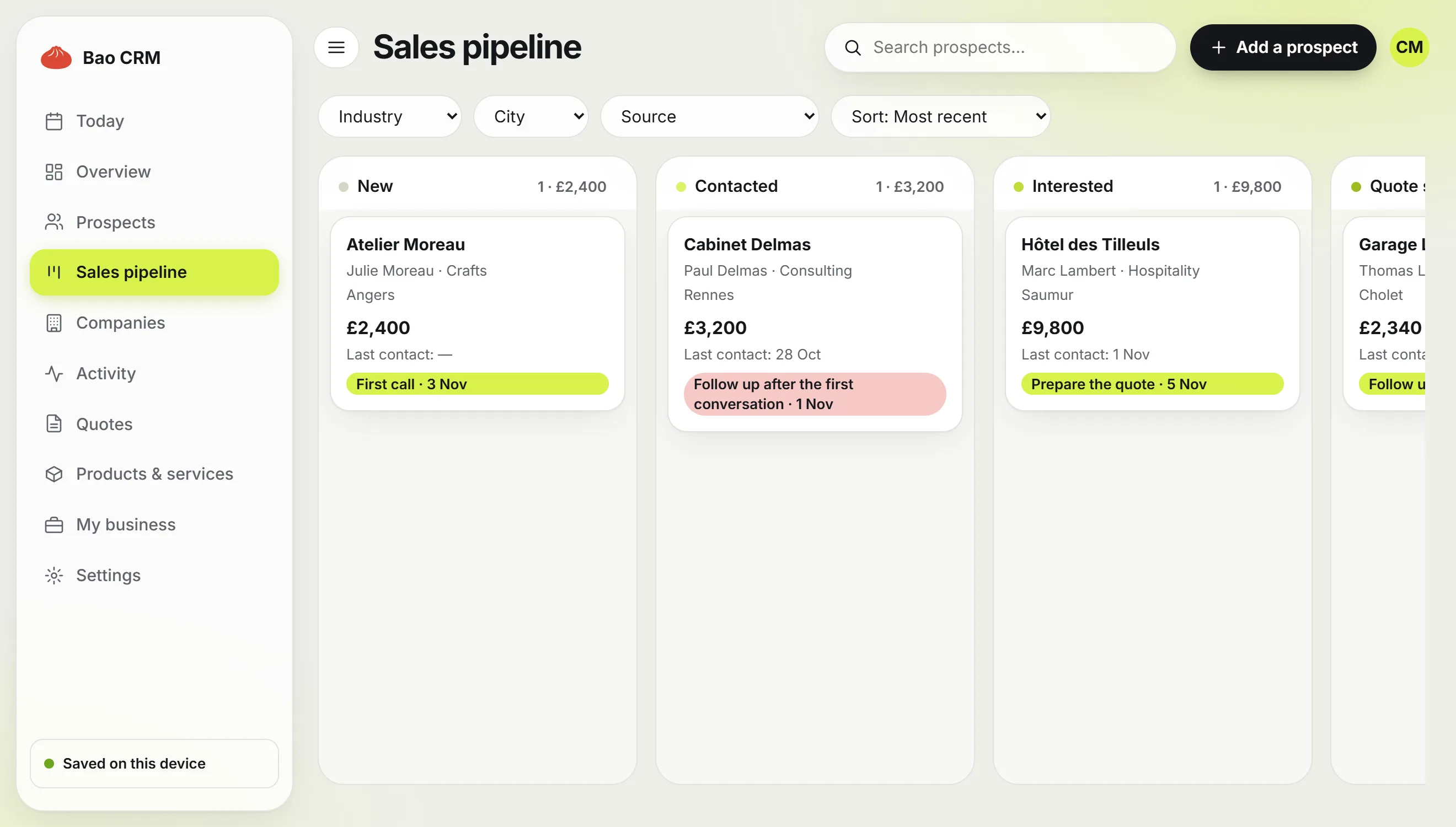
A Notion template takes a minute to duplicate. Then you still have to set up the views, remember the follow-ups and make your quotes somewhere else. That is where deals get lost.
“Who was I supposed to follow up with?”
Every prospect has a next action and a date. Overdue follow-ups come first in your day.
“Is this quote missing anything?”
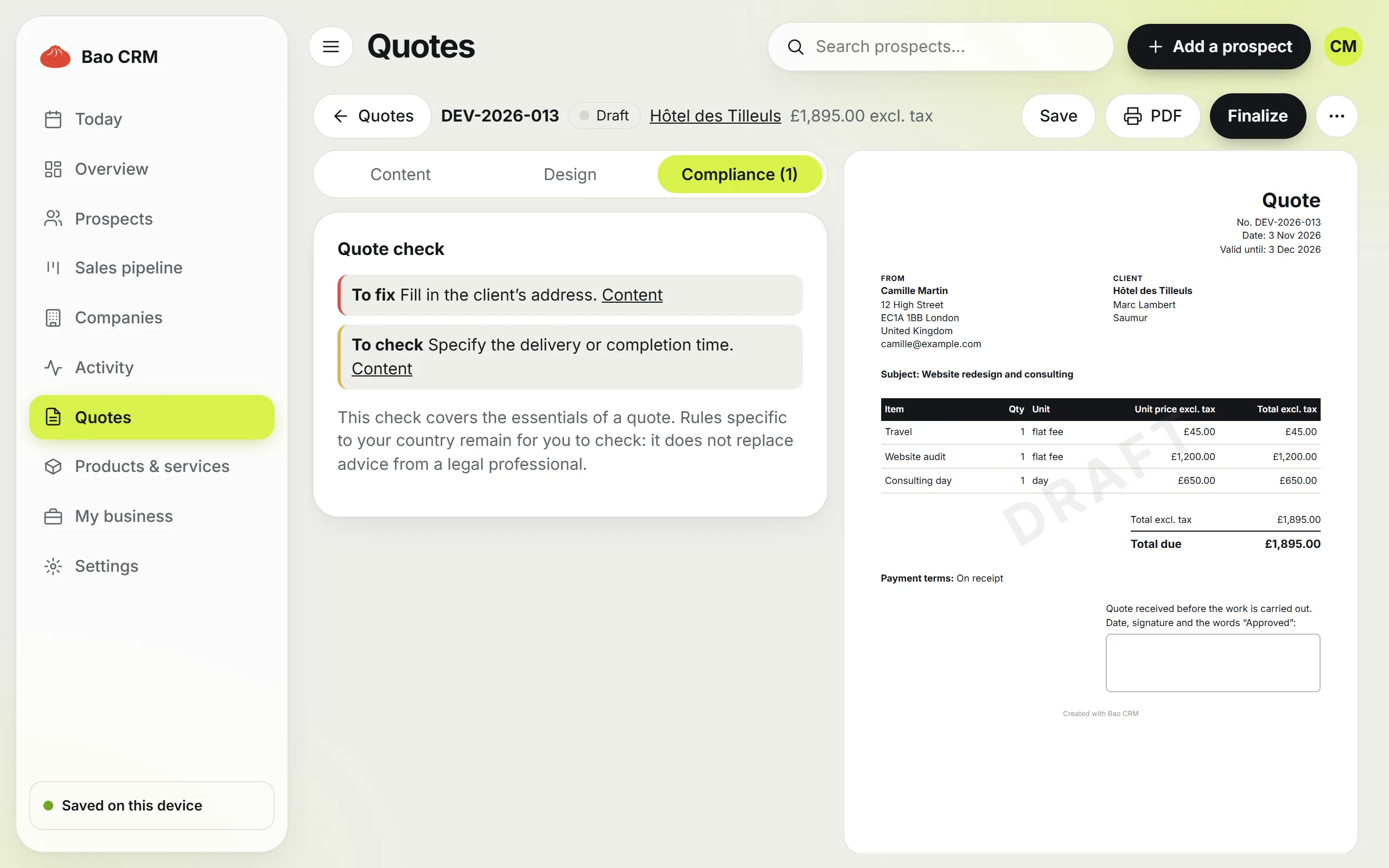
Bao CRM checks the essentials before a quote goes out: both parties’ details, dates, priced lines, terms. While something mandatory is missing, the quote stays a draft.
“Yet another tool to fill in?”
The app opens without signing up. If you work in Notion, your data is saved in your own databases.
A Notion CRM keeps your prospects, follow-ups and sales in your Notion workspace. A free template is enough for a simple contact list. Bao CRM fits when you send quotes and want to track every follow-up.
| Criterion | Bao CRM | Notion template | Classic CRM |
|---|---|---|---|
| Data in Notion | Yes, if you connect it | Yes | No, or through a sync |
| Getting started | No account, Notion in one click | Duplicate, then set up | Account and configuration |
| Today’s follow-ups | Today page | To build with views | Yes |
| PDF quotes | Included, in your currency | In another tool | Depends on the plan |
| Quote checked before sending | Yes, adapted to your country | No | Depends on the tool |
| Teamwork | No, designed for one person | Yes | Yes |
| Price | Free, or Pro at €14.90 per month | Free or one-off purchase | Limited plan or subscription |
General comparison: templates and CRMs vary from one vendor to another.
From the first contact to the accepted quote, everything stays attached to the prospect’s file.
What is overdue, what is due today and what is coming up in the next two weeks. Click Done, and Bao CRM asks what comes next: next action, Won, Lost or Nothing planned.
Each prospect shows its amount and next action. An overdue follow-up turns red.
Their details fill in and your products come from the catalogue. Discounts, deposit and tax rates are calculated, in euros, dollars, pounds or Swiss francs. Each quote can be in English or French. Once the quote is finalized, download the PDF: Bao CRM drafts the email in Gmail, Outlook or your email app, and you attach the file.
A finalized quote stays locked. To change it, duplicate it: the copy gets a new number.
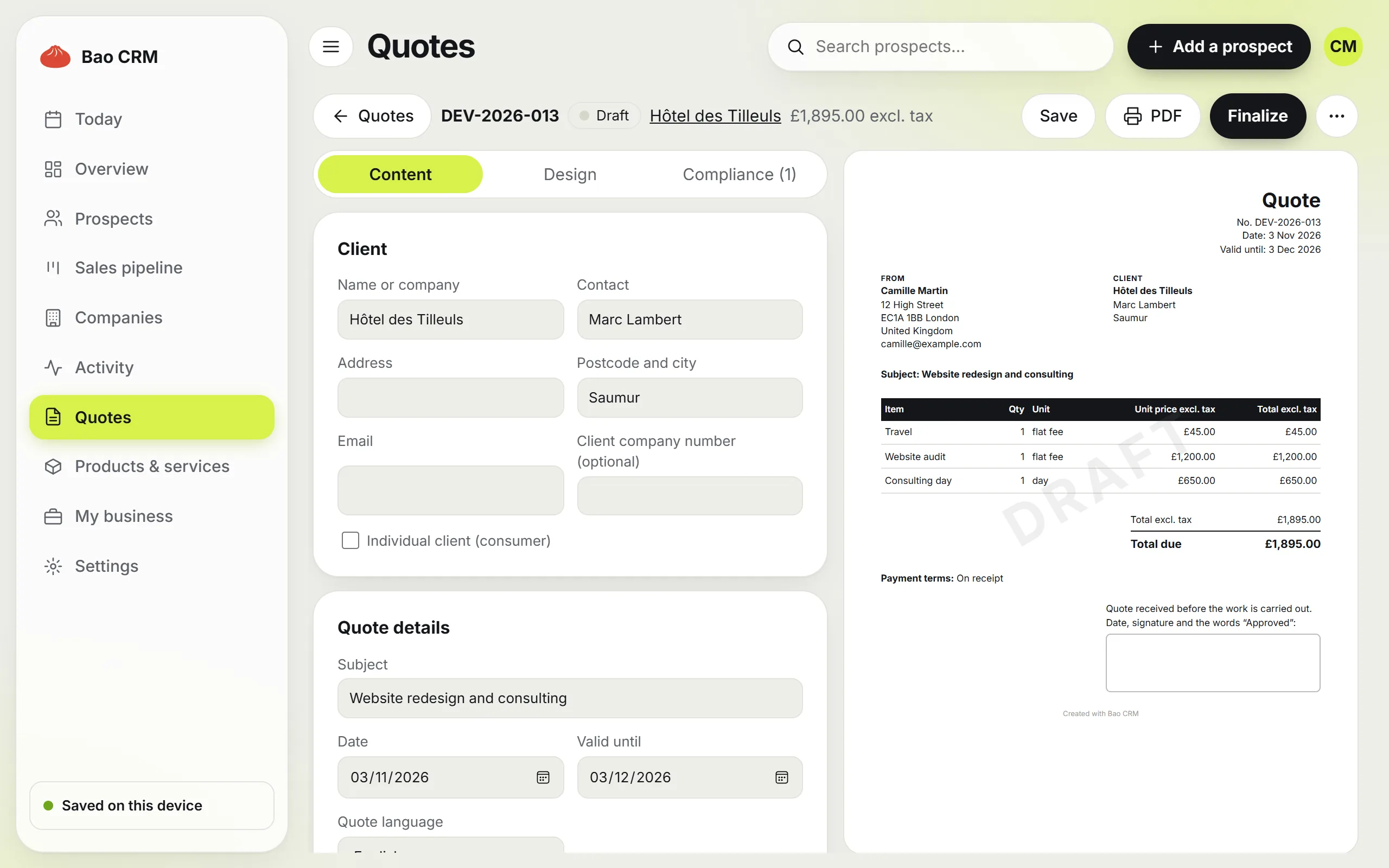
Euro, US, Canadian or Australian dollar, pound sterling or Swiss franc: every amount follows it.
First contact, follow-up, quote follow-up and thank you, with the details already filled in.
Your products and services are added to the quote in one click.
Calls, emails, meetings and notes stay attached to the right prospect.
Add a follow-up to your calendar with an .ics file.
Get your prospects as CSV or your full backup, on the free plan too.
Before a quote goes out, Bao CRM checks what makes it complete and shows you what is blocking and where to fix it. The check follows the country of your business.
| On every quote | What Bao CRM checks |
|---|---|
| Both parties | Your business details and your client’s name and address |
| Dates | Quote date, validity, and a validity that ends after the quote date |
| Lines | At least one priced line, each with a description and a quantity |
| Terms | Payment terms and delivery or completion time |
| Tax | A tax column that stays visible when you charge tax |
Rules specific to your country or your sector remain for you to check: the check does not replace advice from a legal professional.
The app starts in your browser and saves everything on your device. You can try it before touching Notion.
Authorize Bao CRM from Settings. It creates its databases in your workspace and copies over what you have already entered.
Fill in your business details, country and currency once, add a prospect and create their quote. The check tells you what is missing.
Four linked databases, which you find in your workspace like any other Notion page, with English column names.
Your files, their stages and their history.
Your catalogue and your prices.
Each quote with its number and status.
Your legal details and your templates.
Automatic setup. Bao CRM copies a home page into your workspace and creates these four databases in it.
Your data comes along. What is already on your device can be copied into it, with the same quote numbers.
Sync. A change shows up on the other side in about 30 seconds, on all your devices.
Good to know. Bao CRM uses its own databases and does not plug into an existing one. Rename or move the page if you like, but keep the columns as they are.
Without Notion, your prospects, products and quotes stay on your device. With Notion, they are saved in your own databases. Either way, they are not kept on our servers.
The pipeline, the Today page, the notice check, the directory and Notion are included in both plans.
€0
No account or credit card.
€14.90 per month
Cancel anytime. Or €149 per year.
Bao CRM is billed in euros; your own quotes use your currency. Active prospects exclude Won and Lost deals. Pro requires connecting Notion and can be cancelled from Settings: it stays active until the end of the paid period. Afterwards, your quotes can still be viewed and downloaded.
Another question? Write to us.
Bao CRM is designed and published in France by Maxence Hoarau, sole trader. Page updated on 3 November 2026.
A Notion CRM is a customer relationship management system built on Notion. Your prospects, follow-ups and sales live in Notion databases. It can be a template you duplicate or a connected app, like Bao CRM.
Freelancers, the self-employed and small businesses who want their prospects, follow-ups and quotes in Notion, wherever they work. Amounts follow your currency, and the quote check follows your country.
English or French. Each quote has its own language, for the document and the email that goes with it.
No. It is an online app, opened in your browser, that reads and writes to your Notion databases. It adds the pipeline, the Today page, PDF quotes and the check of legal notices.
Not for the free plan: Bao CRM opens straight away and saves your data on your device. Notion lets you find it on all your devices, and the Pro plan is tied to a Notion account.
Notion’s free plan is enough. Bao CRM does not use any feature reserved for a paid plan. Notion is optional on Bao CRM’s free plan, and the Pro plan needs a Notion account, free or paid.
No. Bao CRM creates its own databases in your workspace, with English column names if you use the app in English, and its columns must stay as they are.
Without Notion, your data is erased along with the browser’s. Download a backup regularly from Settings so you can restore it.
Without Notion, your prospects, products and quotes stay in your device’s browser. With Notion, they are stored in your Notion workspace, hosted in the United States by default. The app and your account data are hosted in France by o2switch. Pro payments are handled by Stripe, in Ireland.
Bao CRM only keeps what your account and subscription need, with no advertising or audience tracking. For your contacts’ data, you remain the controller, and Bao CRM acts as a processor if you connect Notion. Your rights and the recipients are detailed in the privacy policy.
Bao CRM checks the essentials of every quote, adapted to the country of your business. You remain responsible for your documents and for the rules specific to your country or sector.
It drafts the email in Gmail, Outlook or your usual email app. You attach the PDF and send it yourself.
No. Bao CRM stops at the accepted quote: keep your invoicing tool.
No. The quote has a signature box to print or sign on the PDF. You then mark the quote as accepted, and the prospect moves to Won.
Yes. Bao CRM opens in the browser and can be added to your home screen. Without Notion, it also works offline after a first visit.
Without Notion, simply stop opening it or clear the browser data. With Notion, delete your account from Settings: any Pro subscription is cancelled, and your prospects, products and quotes stay in your Notion.
Open Bao CRM and add your first prospects. You can connect your Notion when you are ready.
Try it free